
Services and Information
Report an Incident & Appointments
Business Practices, Policies, & Resources
Announcements
Information Security Careers: Empowering Local High School Students to pursue Information Security Careers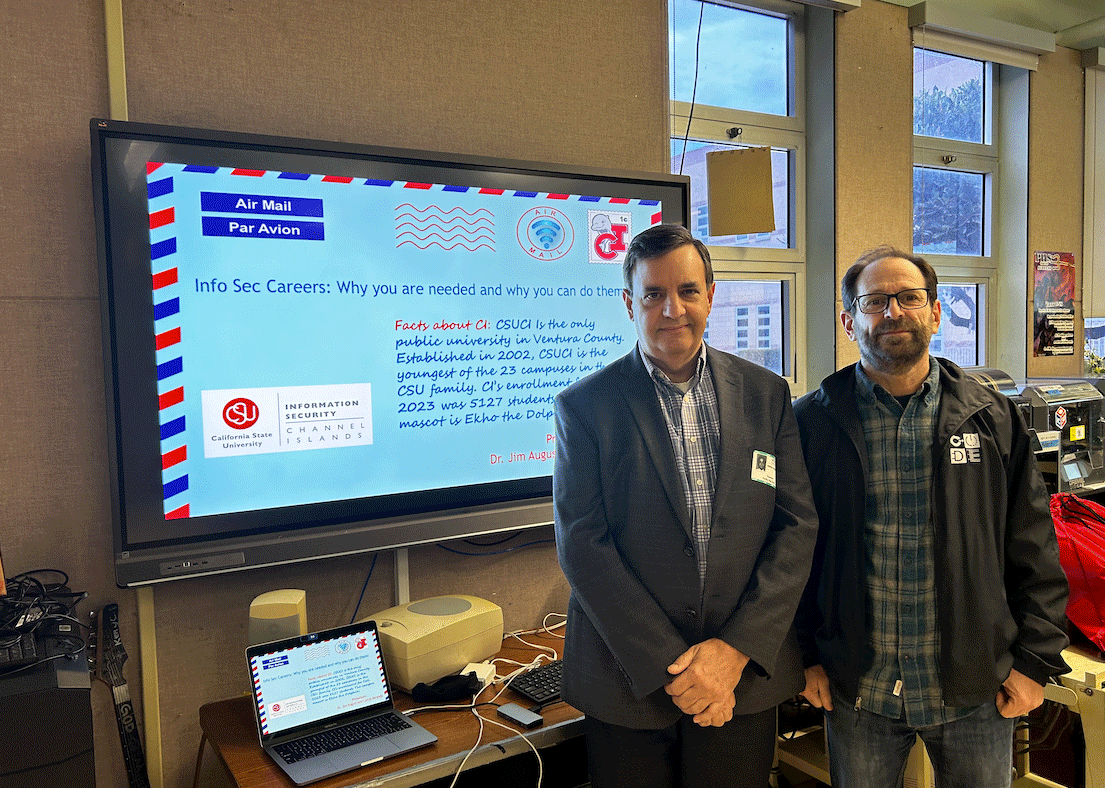
ITS (Jim August and Carlos Miranda) recently enjoyed conducting engaging hour-long in-person and virtual presentations at Pacifica High School and Camarillo High School titled "Info Sec Careers: Why you are needed and why you can do them!"
During the sessions, we delved into the world of information security, discussing the importance of these careers and highlighting the opportunities available to students from all backgrounds. We aimed to inspire the students by emphasizing the demand for these roles and their capability to excel in this field. Information Security needs women, minorities, and other candidates from diverse backgrounds for good-paying jobs.
Key highlights:
Understanding Information Security: We provided an overview of information security, its significance in today's digital landscape, and its crucial role in safeguarding data.
Education: Graduating High School Students can look at going to CSUCI for majors such as Information Technology and Computer Science and, coming soon, a Master’s Degree in Cybersecurity.
Career Pathways: Exploring various career paths within information security, we showcased the diversity of roles available, ranging from ethical hacking to cybersecurity analysis and beyond.
Certifications: Our goal was to empower the students by emphasizing that these careers are not only in demand but also accessible with dedication, passion, and continuous learning. The session provides an overview of the different Information Security professional certifications and the skills needed to attain them.
Interactive Session: We engaged the students through interactive discussions, answering their questions and encouraging them to consider the diverse opportunities within information security.
We hope that our session sparked interest and curiosity among the students about the exciting world of information security, inspiring them to consider a career path in this ever-evolving and crucial field.
A huge thanks to Pacifica and Camarillo High School for the opportunity to connect and share insights into the world of information security careers!
On Friday October 20, 2023, for Cybersecurity Awareness Month (CSAM), CSUCI had four members of L.A.’s F.B.I. Division on campus for a session about "Internships, Careers with the FBI". The session covered the following key points:
1. Introduction to the FBI:
- An overview of the FBI's mission.
2. Internship Programs:
- The FBI offers a variety of internship programs for undergraduate and graduate students.
- Interns can gain experience in areas such as cybersecurity, intelligence analysis, criminal investigation, and more.
3. Entry-Level Careers:
- The FBI recruits individuals with diverse backgrounds and skills, including intelligence analysis, linguistics, computer science, and more.
- Special Agent positions were discussed, which require a rigorous application process, including background checks, physical fitness tests, and interviews.
4. Career Development:
- Participants were informed about the various career paths within the FBI, including leadership roles and specialized positions in fields like cybercrime, counterterrorism, and counterintelligence.
5. Application Process:
- Detailed information on the application process for internships and careers.
- The importance of accurate applications, significance of integrity in the selection process.
6. Q&A Session:
- The session concluded with a question-and-answer, where attendees could ask questions about the recruitment process, work culture, and opportunities.
Read the full session overview: https://itnews.csuci.edu/2023/10/internships-careers-with-fbi.html
Cybersecurity Awareness Month 2023
October 2023 marks the 20th Cybersecurity Awareness Month (CSAM).
The focus of this year’s CSMA is on four key behaviors:
- Turning on Multi-Factor Authentication (MFA). Having a strong password is not good enough; using MFA can increase your ability to prevent a scammer from getting access to your account. MFA is available from Apple, Google, Microsoft, Instagram, LinkedIn, and other companies. To look for what companies offer MFA try using https://2fa.directory/us/
- Using strong passwords and a password manager. It’s difficult to remember all the different passwords, and when they are complex, it is a bit difficult. Having a good password manager can help keep your password organized.
- Updating software regularly. Your software on your phone, computer, and even in the car needs regular updates. Not only do you get new features, but a lot of security is incorporated into the updates.
- Recognizing and reporting phishing. Take a moment and read the email. Who is the email address that sent the email? Never click on a link in the email; always go to the site by typing the address manually. For more tips on avoiding scams, the FTC has several more examples: https://consumer.ftc.gov/articles/how-avoid-scam.
AI bots in MS Teams and Zoom meetings
Artificial intelligence (AI) Bots have started showing up to meetings. If you are starting to see apps like Otter.AI and Read.AI, these are AI bots added to the meeting (Teams and Zoom) by the host. While it may seem convenient, this also creates a privacy and security problem. Like any recorded meeting, it will be sent to the cloud, and sensitive information can be accessed. If you are in a meeting, let the host know that you do not want it recorded and what the expectations are around privacy. The host can disable an AI bot. With any new technology, significant recent advances can bring on other problems.
Our partners in TLI have a knowledge base with more information:
AI Meeting Assistants
CI Students, join the CI NETSEC Club
CInetsec is a club where you can learn about cybersecurity in a group setting
and practice techniques with the support of others. We hope to learn through CTF exercises and participation, Blue/Red Teaming, discussion, research, and guidance from several people in the field. Any level of experience is welcome. Come get creative!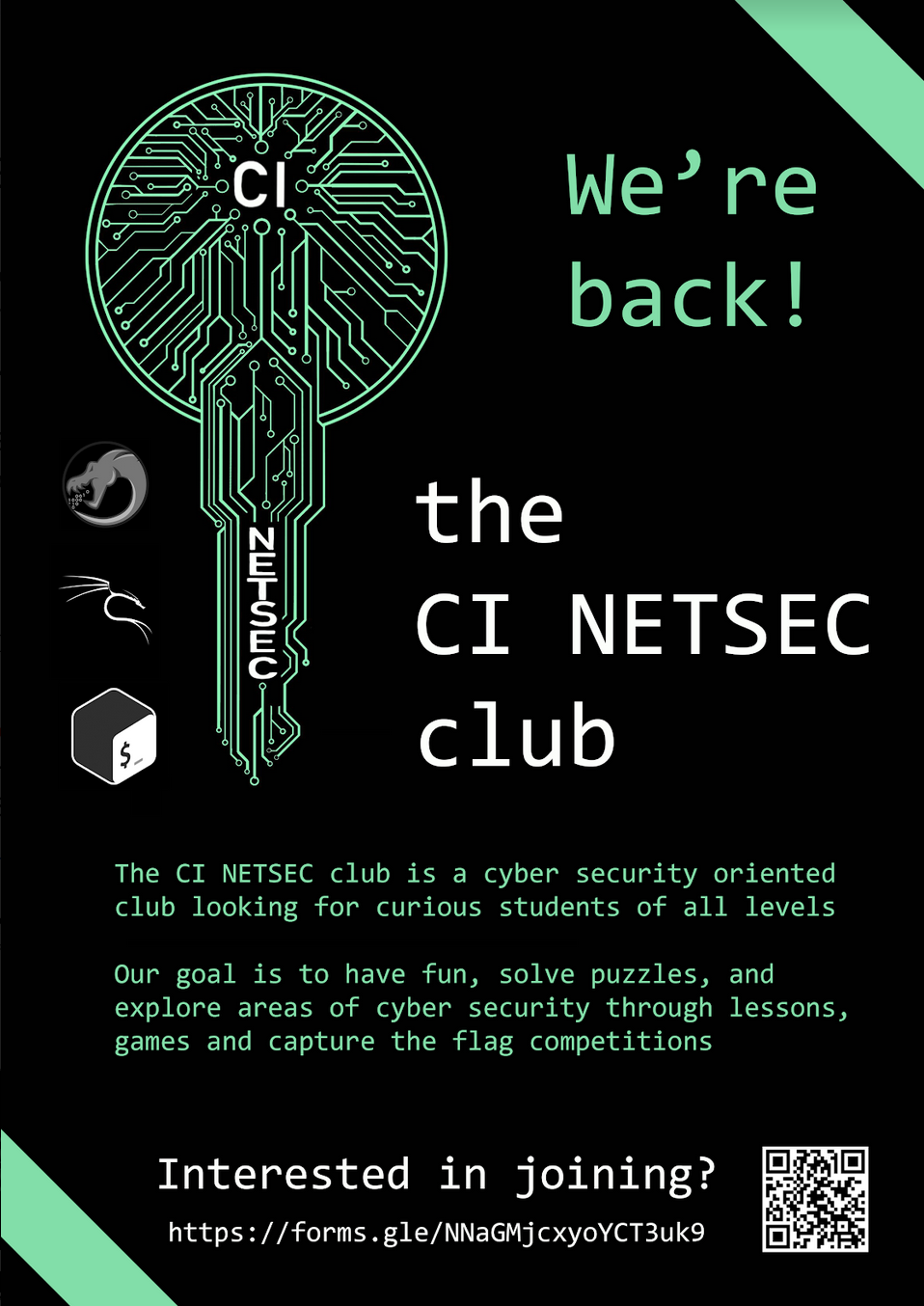
Keep your data safe this Summer Break
- Tips for securing your data on the go can be found at Be Cyber Safe.
- Review security measures for booking and travel needs with Travel Requires Online Precautions.
CSUCI is offering webinars for Cyber Security Awareness Month (CSAM)
- “CompTIA” on Tuesday, Oct. 25, at 10 a.m. — James Stanger, chief technology evangelist with CompTIA (Computing Technology Industry Association), will discuss the steps involved in becoming a qualified cybersecurity professional.
• “ITPRO TV” on Thursday, Oct. 27, at 10 a.m. — Representatives from CSUCI and ITPRO TV, which provides online IT training, will discuss the cybersecurity field and the many career opportunities.
• “Degree or Certification” on Thursday, Oct. 27, at 2 p.m. — CSUCI and CSU Chico representatives will discuss whether a cybersecurity degree or certification is the best choice in 2022.
This years theme is #See yourself in Cyber. For information on the webinars, visit the CSUCI and CSU Cybersecurity Awareness Month pages.
Multi-Factor Authentication is now live for all Students, Faculty and Staff
CI Rolls out Multi-Factor Authentication.
On June 2, 2020 Information Security completed the roll out of Multi-Factor Authentication for students, faculty, and staff. This security feature will provide a greater level of protection for your myCI credentials and the information accessed while using myCI systems and services. Information about Multi-Factor Authentication at CSUCI may be found at Multi-Factor Authentication (MFA).
Please contact CSUCI's Information Security Team at infosec@csuci.edu if you have any questions.
New "Fake Job Offer" Texting Scam for Students Being Reported

A new variant of the "fake job offer" phishing scam has started to be reported and is targeting CSUCI students. Have you received a job offer via text from a job you didn't apply to? With a follow-up interview on Zoom. CSUCI has seen an increase in job scams recently targeting our student population via text to their personal smartphone. Here are some ways to spot these employment scams:
- If it sounds too good to be true, it probably is.
- Do your research, look online, and reach out to infosec@csuci.edu if you have any questions or concerns.
- Most jobs require a resume, an interview, a background check, and a job application.
- Asking you to buy a gift card to iTunes or any other service is a sign the offer is a scam.
- Do not share your information until you have verified the possible employer as being legitimate.
For on-campus jobs, please visit the Dolphin CareerLink:
https://www.csuci.edu/careerdevelopment/services/dolphin-careerlink.htm
For more information or questions about Information Security, contact CSUCI's Information Security Team at infosec@csuci.edu or visit Information security.
Securing Zoom Meetings
Check out this new resource on how to better secure your Zoom meetings for meetings or classes.
"Walk-in" virtual Office hours powered by Microsoft Teams
Virtual "walk-in" office hours are available via Microsoft Teams from 10:00 am to 2:00 pm (Excluding noon) Monday through Friday on a first-come, first-serve basis.
Beware of Coronavirus (COVID-19) Scams
Most of us have seen and read in the news about the Coronavirus outbreak, currently known as SARS-CoV-2 or Coronavirus Disease 2019 (COVID-19). CSUCI wants to remind you that during media intense events like this, cyber attackers take advantage, and attempt to scam you or launch phishing attacks that attempt to get you to click on malicious links or open infected email attachments.
Information on Coronavirus (COVID-19) scams and best practices and how to spot these scams.
Reported Coronavirus (COVID-19) Scams
March 10, 2020 - Fake Online Coronavirus Map Delivers Well-Known Malware
Guiding Principles / Mission Statement
Information Security works with the campus community to secure system and network resources, and protect the confidentiality, integrity, and availability of student, faculty, and staff information.
To support this mission, Information Security will:
- Develop processes, procedures, and policies required for the protection of confidential information
- Identify risks to the security of information and systems and mitigate these risks to levels acceptable to the campus
- Define security requirements, establish baselines and measure compliance, based on applicable laws, regulations, and best practices
- Consult with campus users and departments to investigate security issues and evaluate products and processes
- Collaborate with ITS administrators and staff to develop the campus information security strategy and architecture
- Ensure incident response and disaster recovery plans are developed and implemented
- Respond to and recover from disruptive and destructive information security events
- Increase campus awareness of information security through training and communication
Phishing News and Updates

The IRS is warning faculty, students, and staff of an impersonation email scam targeting educational institutions, primarily those with a “.edu” email address. The suspect emails display the IRS logo and use various subject lines such as “Tax Refund Payment” or “Recalculation of your tax refund payment.” It asks people to click a link and submit a form to claim their refund. Taxpayers who believe they have a pending refund can easily check its status on “Where’s My Refund?” on IRS.gov.
If you receive this or any scam email, do not click on any link(s) in the email. We ask that you are vigilant of this and all other potential phishing scams.
Information Security News
View ITS' blog where you can find helpful tips on several IT subjects.
Tips for Home Computer Health and Security
The following set of tips will help keep your home computer healthy and running smoothly, as well as reduce your exposure to viruses or other security breaches.
For Windows PCs (Windows 10)
- Run Windows Update frequently to make sure your computer is up-to-date
- To run Windows Update, go to http://windowsupdate.microsoft.com/
- Follow the instructions to scan your computer for updates and download the latest updates.
- Visit Microsoft to configure Windows update to run automatically
- Microsoft patches are generally issued on the second Tuesday of each month.
- Install antivirus software on your computer
- Microsoft's Security Essentials comes free with your Windows installation, however other anti-virus products are available.
- Buy online through the CI Bookstore
- Configure your Firewall software
- Built in to Windows, make sure you enable it.
- Don’t open email messages from people you don’t know or trust (phishing)
- This is most often how viruses spread and how people gain access to your computer.
- Also, do not open any files attached to an email unless you know what it is, even if it appears to come from a dear friend or someone you know. Many viruses can replicate themselves and spread through email.
For Mac PCs (OS X, all versions)
- Run Software Update to make sure your computer is up-to-date
- Go to the Apple menu and select “System Preferences…”
- Under the System category, select “Software Update.”
- Make sure the “Check for updates” box is checked, and specify the frequency in the drop-down menu. Check the “Download important updates” in the background box.
- Select “Check Now” to run Software Update.
- Software Update will show a list of updates available for your computer. Check which updates you would like to install and choose the “Install” button.
- Further instructions available
- Install antivirus software on your computer
- Many vendors offer anti-virus for your Apple computer.
- Buy online through the CI Bookstore
- Configure a Firewall on your Mac
- Instructions are available from Apple.
- Don’t open email messages from people you don’t know or trust (phishing)
- This is most often how viruses spread and how people gain access to your computer.
- Also, do not open any files attached to an email unless you know what it is, even if it appears to come from a dear friend or someone you know. Many viruses can replicate themselves and spread through email.
Password Security
For information on password security, please see Password Tips.
Security Policy
Information security policy information can be found on the Policies and Procedures page and the President's Council page.
Anti-Virus Software Information
An active working anti-virus is recommend on any computing system. Several great choices include: Microsoft Defender, Malwarebytes, McAfee and ESET NOD32.