
Revised March 20, 2013
Table of Contents
- Overview
- Before You Begin
- Access Option #1: Adobe Dreamweaver
- Access Option #2: SFTP Clients
- Location of Student Web Pages
- Troubleshooting
- Questions/Problems
Overview [top]
This guide provides University students with instructions for accessing their student web space at CI. Access from on- and off-campus is available via Dolphin Files and via the SFTP protocol.
Please be careful! Any documents placed in a student's web space will be viewable and downloadable by the general public. Students should not place sensitive or confidential information or data in their student web space.
Before You Begin [top]
You will need to activate your student account before you can access your student web space. Until you do, you will not be able to add/remove files from that web space.
To activate your account, please visit the Dolphin Account Activation Page.
Once your account has been activated, you may access your student web space.
Please be careful! Any documents placed in the "public_html" folder in Dolphin Files will be viewable and downloadable by the general public. Do not place sensitive or confidential information in the "public_html" folder.
Access Option # 1 - Adobe Dreamweaver (via SFTP) [top]
Adobe Dreamweaver is installed on computers in the open computer labs and in many classrooms on campus. Adobe Dreamweaver has a built-in SFTP client.
Configure Dreamweaver
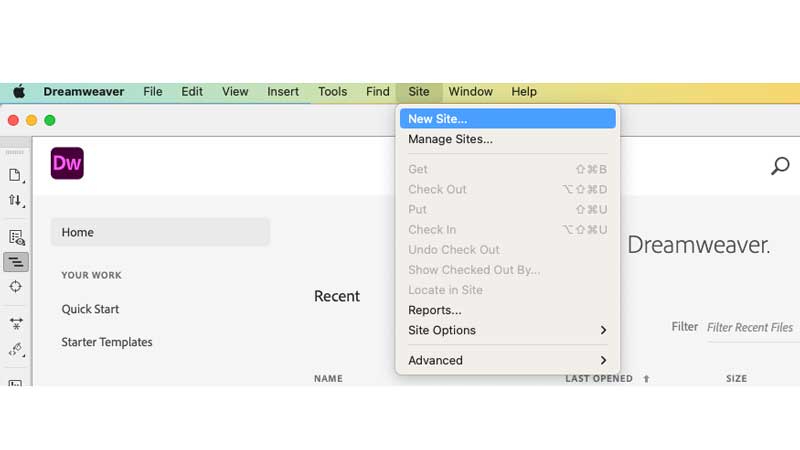
- From the “Site” menu, select “New Site…”
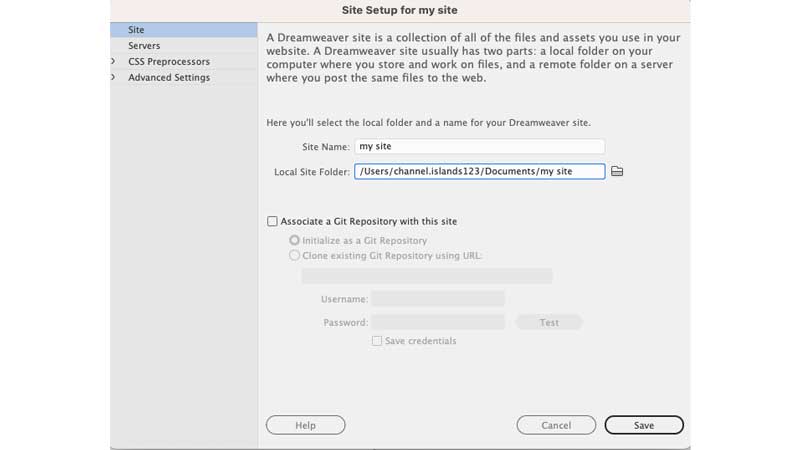
- Enter a name for “Site Name” and navigate to the portfolio folder on your USB flash drive for, “Local root folder. For example,“Site Name”would be “my site”.
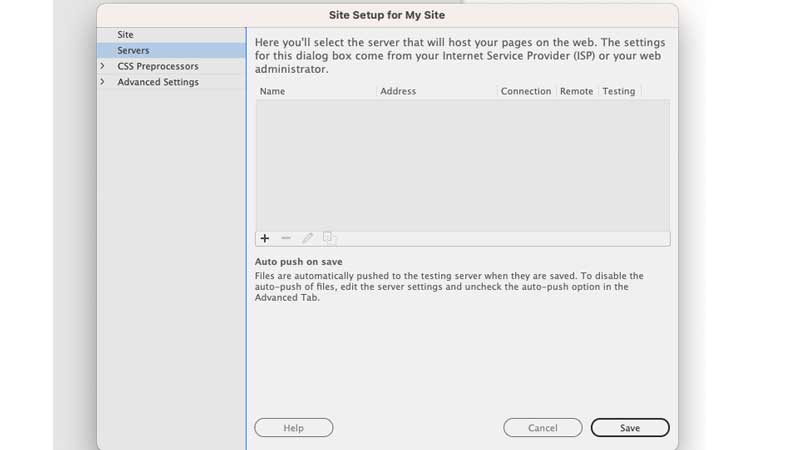
- Click on the “Servers” tab.
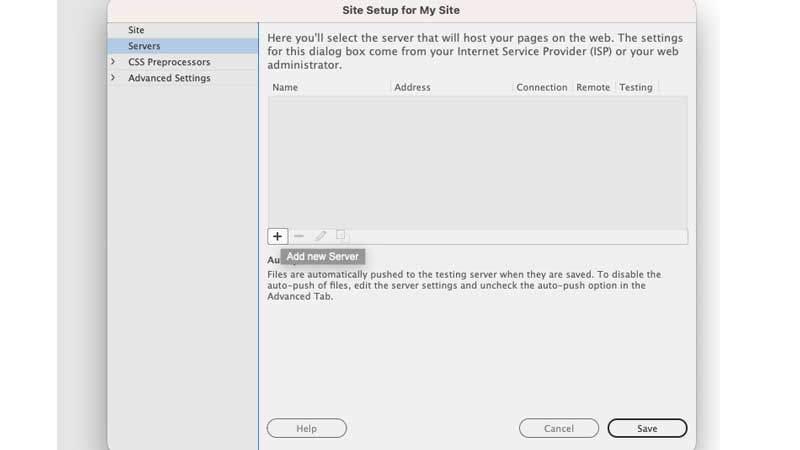
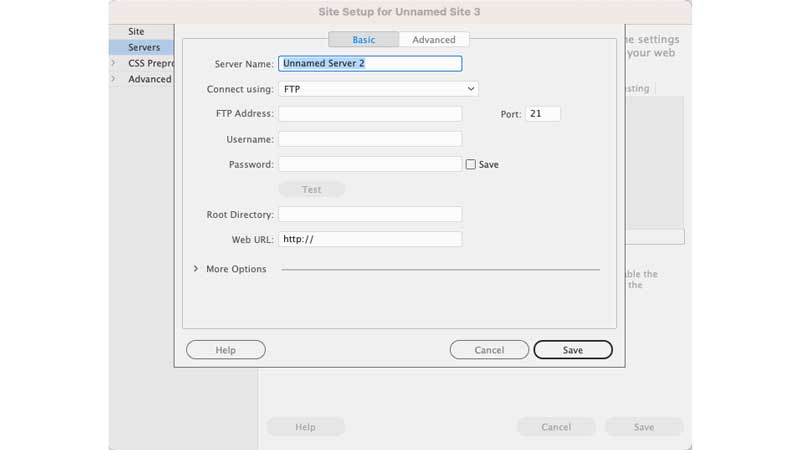
- Select the “+” sign to “Add new Server”.
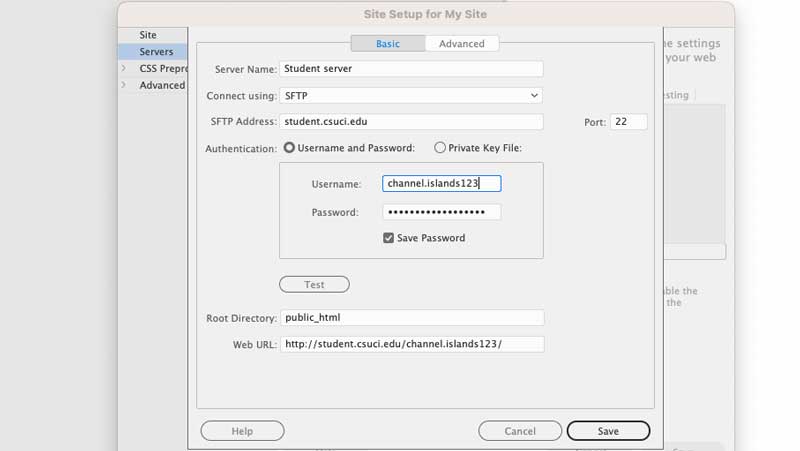
- Enter the following in the text boxes:
- Connect using: SFTP
- SFTP Address: student.csuci.edu
- Root Directory: keep it empty (if you do not have a public_html folder)
- FTP Login: This is the first 20 characters of your Dolphin User Name More information on your Dolphin User Name can be found at: http://www.csuci.edu/tc/accounts/
- FTP Password: This is your Dolphin Password. More information on your Domain password can be found at: http://www.csuci.edu/tc/accounts/
The URL (i.e., web address) to the home page of your student web site is:
http://student.csuci.edu/ + "~" (the tilde character) + your Dolphin Name
- Make sure that the “Save” checkbox is checked. This will allow you to access your web site without having to retype your password each time
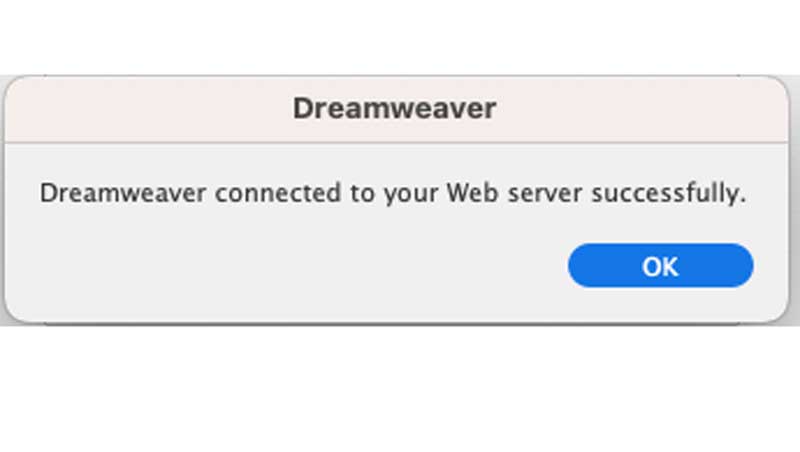
- Click on “Test” to verify the information filled out is correct. All is well if you receive a message that reads “Dreamweaver connected to your Web server successfully.” Save all of your server settings.
- You are now finished with the configuration.
Access Option # 2 - Other SFTP Clients [top]
About other SFTP clients
To access your student web space, you can also use a Secure FTP (SFTP) client (a client is software that can create a connection from your computer to your web space).
There are many free, open-source SFTP clients that you can use to connect to your student web space via SFTP and which run on a variety of platforms, including:
Microsoft FrontPage does not have an SFTP client and therefore cannot be used to directly access your student web space.
SFTP Configuration for Other Clients [top]
Every SFTP client has a place to configure connection settings to your student web space. However, location of these configuration settings vary depending which software you use. Please check the Help documentation that accompanies your SFTP client software for information on where to add these settings.
In all cases, there are 3 pieces of information you need to configure your FTP client to connect to your student web space:
- SFTP Host Name (sometimes called "Host Name" or "Host Address")
- Set this to: student.csuci.edu
- Set this to: student.csuci.edu
- SFTP User Name
- This is the first 20 characters of your Dolphin Name
- For example, a student named Pat Havealonglastname with a CI ID of "pat.havealonglastname123" would have an SFTP user name of pat.havealonglastnam
More information on your Dolphin Name can be found on the Account ID's and Passwords page.
- SFTP Password.
- Your SFTP password is your Dolphin Password.
- More information on your Dolphin Password can be found on the Account ID's and Passwords page.
- Initial/Remote Folder. When you connect via SFTP, you will connect to your base folder on the web server. You must place documents that you want to appear on your public web site within the "public_html" folder. The "public_html" folder is the root folder for your web space. Most SFTP clients will enable you to specify the initial folder that you connect to; it is recommended to specify this as public_html in your settings.
Once you enter this information in your web publishing software or your SFTP client, you should be able to connect and publish files to your student web space. If you receive an error when trying to connect to your web site via SFTP, or when transferring files, please see the “Troubleshooting” information below.
Location of Student Web Pages [top]
All student web pages share the same basic naming convention.
The URL (i.e., web address) to the home page of your student web site is:
http://student.csuci.edu/ + "~" (the tilde character) + your Dolphin Name
Example a student named Pat Smith with the Dolphin Name “pat.smith123” would have the following web site home page: http://student.csuci.edu/~pat.smith123
Important note about your Student Home Page
When publishing your home page to your web space, you must name your home page “index.html”. This will ensure that when someone goes to your web site address (as in the above example), the web page called index.html will be the first page which appears.
Troubleshooting [top]
Most issues reported regarding accessing student web sites are related to user error, such as typos in the SFTP host name, SFTP user name, or SFTP password (80-90%). 10-20% seem to be related to other server-based account configuration issues, SFTP software issues, or inability to connect using SFTP protocol due to port or firewall restrictions.
Also, make sure you place your documents in the "public_html" folder if you wish them to appear on your student web space. Files not placed within this folder will not be visible by the general public.
Step-By-Step Test for Common Errors and How to Fix Them
Perform the following steps in order to resolve your issues.
- Try to logon to MyCI. If you can't, then ether your account hasn't been activated or you have not entered the correct Dolphin Name and Password. Please refer to the MyCI Help documentation for assistance.
- Try to access Dolphin Files from MyCI. Go to MyCI, logon with your Dolphin Name and Password, and click the "Dolphin Files" link. If you cannot see Dolphin Files, please contact the IT Help Desk (see "Questions/Problems" section below).
- Double-check the spelling of your SFTP user name in your SFTP client. Make sure you spelled your Dolphin Name correctly.
- Double-check that your password is entered correctly in your SFTP client. If you forgot your password, you can reset it by going to MyCI, and clicking on the "Recover Your Password" link.
- Double-check that the SFTP host name is spelled correctly in your SFTP client. If should read: student.csuci.edu
- Check to make sure that a remote directory name is not specified in your SFTP configuration. When you logon to your web site via FTP, you will be automatically re-directed to the correct folder which contains your web site contents.
- Try to access your web site via SFTP from on-campus using a computer in an open computer lab, such as the Library. If you can access your web site from the on-campus network, this means that it's likely an issue with your local computer.
- If you can access your student web space via SFTP from on-campus but not off-campus.
- Verify that your computer software firewall is not blocking the SFTP port (port 22).
- Verify that your network/wireless router is not blocking SFTP traffic on port 22. Refer to your network/wireless router documentation for instruction on unblocking traffic to specific ports.
- If steps 1-8 do not resolve your SFTP connectivity problem, please contact the IT Help Desk (see "Questions/Problems" section below).
Questions/Problems [top]
For answers to frequently asked questions, please refer to the Web Services FAQ.
Please report problems or questions about access to student web space to the IT Solution Center, or call 805-437-8552.