
Table of Contents
- Overview
- Comparison of CI's Three Wireless Networks
- Eduroam
- Wireless Access for Guests
- Wireless Access for Traveling CI Students and Employees
- Wireless Protocol Support
- Wireless Network Cards
- Locations and Coverage Areas
- Other Wireless Devices
Overview
CI is serviced by over 300 wireless access points dispersed across the campus, which provide coverage for major campus facilities.
There are three wireless networks at CI:
- CI
- CI_GUEST
- eduroam
All three are available and visible when connecting a computer or other device via a wireless connection.
Comparison of CI's Three Wireless Networks
The following table describes the differences between CI, CI_GUEST, and eduroam wireless networks at CI:
| Network Name: | CI | CI_GUEST | Eduroam |
|---|---|---|---|
| Access for: | Students and employees only | Guests, and visitors | CI students, faculty, and staff as well as guests visiting from other eduroam universities |
| Use with University-owned computers? | Yes | No | Yes |
| Use with personally-owned computers? | Yes | Yes | Yes |
| Secure access to Internet? | Yes | No | Yes |
| Access networked printers? | Yes | No | Yes |
| Access shared network drives? | Yes | No | Yes |
| Guest access? | No | Yes | Yes |
| Requires logon using Dolphin Name and Dolphin Password? | Yes | No | No Requires eduroam campus email & password used for email |
Eduroam
This service allows traveling and visiting students, faculty, and staff to connect securely to wireless networks using their home campus' user name and passwords. Visit the eduroam site for participating colleges and universities located in more than 60 countries around the world.
There is no need for members of the CI community to sign up for guest wireless access at other participating eduroam campuses. Devices will work the same as they do at one's home campus.
Features
- Offers a secure wireless network for traveling researchers at participating remote institutions, using the researcher's credentials.
- No new username or passwords are required.
- Compatible with Mac and Windows laptops, as well as iOS, and Android mobile devices.
- Eduroam is a free service.
Getting Started
- Configuration varies based upon device (Windows 7, Mac, iOS, and Android). If you require assistance contact the Solution Center at 805-437-8552 or visit IT Solution Center
- When you are a participating institution, select eduroam as your wireless network.
- To log in, enter your full campus email address (e.g., user.name@yourschool.edu) and the password you use for the email address.
Learn More
Data Security
- Eduroam is a WPA2-encrypted wireless network. For more information on data security while using eduroam, see the eduroam website.
Support
- For assistance, please contact the Solution Center at 805-437-8552 or visit IT Solution Center
Wireless Access for Guests
CI provides two wireless networks for campus guests. If your home institution/campus is eduroam enabled, you may use the eduroam network. If it is not, or you are not certain, you may use CI_GUEST.
Once connected to CI_GUEST, use your web browser to open the captive portal, agree to our Terms of Use, then click "Log In".
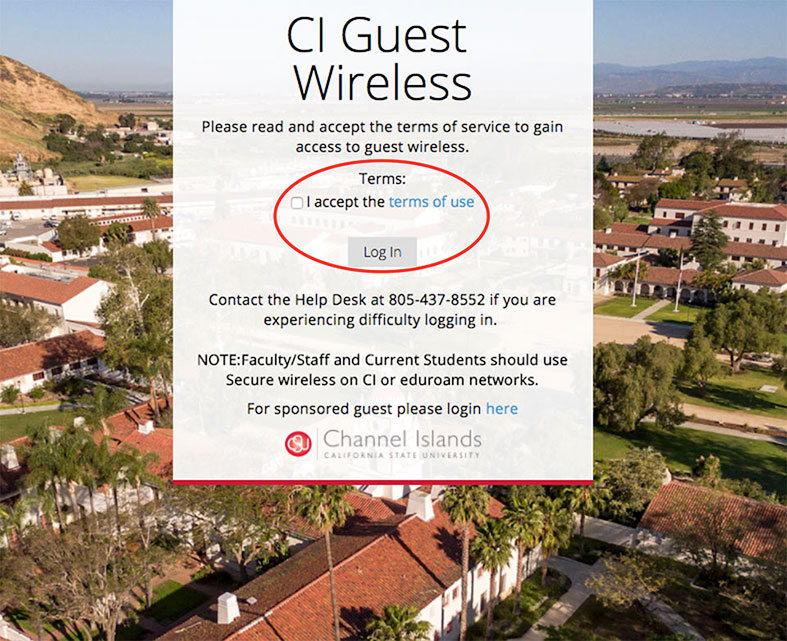
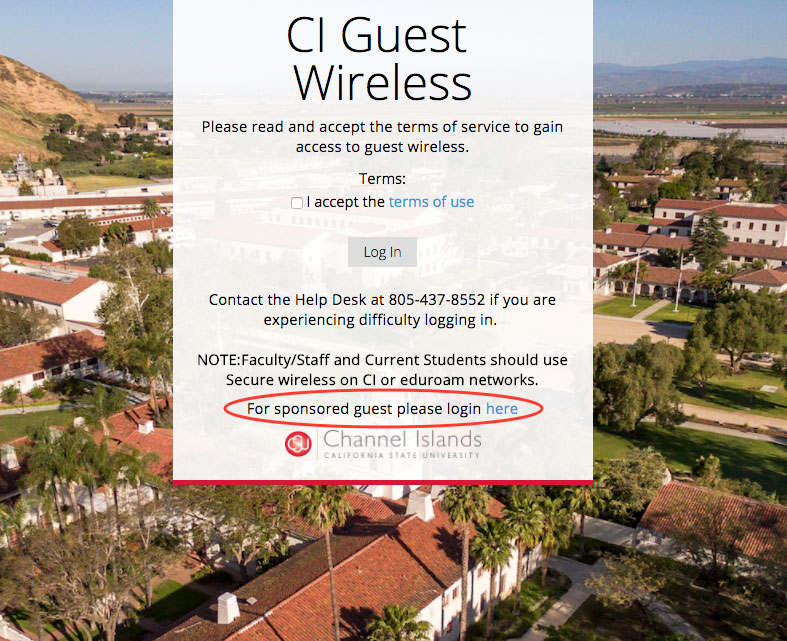
Alternately, the host organization at CI may provide you with a wireless username and password. If the host organization has given you a wireless username and password, click the link provided "For sponsored guest please login here".
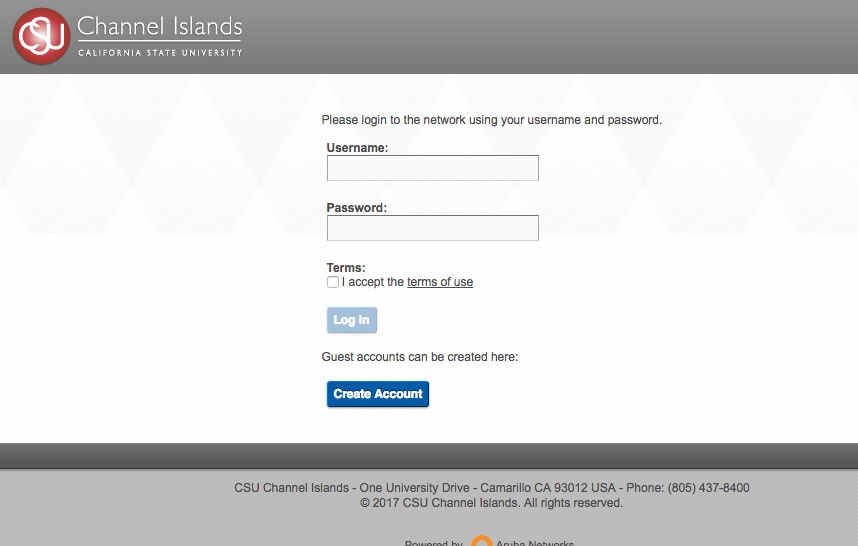
You will be redirected to a separate login page. Enter your username and password, accept the Terms of Use, and select the button "Log In".
Wireless Access for Traveling CI Students, Faculty, and Staff
If you are a CI student, faculty, or staff member and you have an active CSUCI directory username and password, you can use them to connect to wireless at eduroam enabled institutions.
Wireless Protocol Support
Campus access points will all support the Wifi 6 and below wireless Internet protocols. Older devices will still be supported.
Connecting to the CI_Guest Network
Connecting to the eduroam Network
Wireless Network Cards
Most laptops contain a wireless card that will support a recent version of wireless. To optimize performance ITS recommends that you keep all drivers up to date. External Adapters can also be purchased and ITS recommends purchasing one that is compatible with Wifi 6
Location and Coverage Areas
The following tables describe available indoor and outdoor wireless access areas.
| Location | Coverage |
|---|---|
| Aliso Hall | Excellent |
| Anacapa Village | Good |
| Arroyo Hall | Good |
| Bell Tower | Good |
| Broome Library | Excellent |
| Bell Tower East | Excellent |
| Bell Tower West | Fair-Good |
| Central Plant | Excellent |
| Chaparral Hall | Good |
| Del Norte | Excellent |
| El Dorado Hall | Excellent |
| Grand Salon | Excellent |
| Ironwood Hall | Excellent |
| Islands Cafe | Excellent |
| Lindero Hall | Excellent |
| Madera Hall | Excellent |
| Malibu Hall | Excellent |
| Manzanita Hall | Excellent |
| Modoc Hall | Excellent |
| Napa Hall | Good |
| Ojai Hall | Good |
| Paint Shop | Good |
| Petit Salon | Excellent |
| Placer Hall | Excellent |
| Sage Hall | Excellent |
| Santa Cruz Village | Excellent |
| Shops | Excellent |
| Sierra Hall | Excellent |
| Smith Decision Center | Excellent |
| Solano Hall | Excellent |
| Topanga Hall | Good |
| Town Center (Business) | Good |
| Trinity Hall | Excellent |
| University Hall | Excellent |
| Yuba Hall | Good |